 Notes
Notes

|
|
Use the text editor NOTES to create text notes. You can type your notes and edit them later. Not only is this a very high quality editor, but it is also easy to use.
Select Notes icon on the Main Desktop and press <Enter>. You'll see the Open File screen (see Fig.1.)
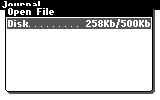
Figure 1. Open File screen
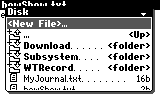
Figure 2. File list
Note: You can open only one file. To open another file, you should close the previous one.
Type text from the keyboard.
Table 1. Operations with text
| Buttons | Operation |
| <Left/Right arrows> | Move the cursor one character left/right. |
| <Up/Down arrows> | Move the cursor one line up/down. |
| <Ins> | Toggles insert/overwrite mode. |
| <Del> | Deletes a character after the cursor if it works as <Del>, or deletes a character before the cursor if it works as <BackSpace>. |
| <Shift><Del> | Toggles the function assigned to the <Del> button (it works either as <Del> or as <BackSpace>) |
| <Enter> | Inserts a line break. |
| <Fn><Left/Right arrows> | Moves the cursor to the beginning/end of line. |
| <Fn><Up/Down arrows> | Moves the cursor one page up/down. |
| <Shift><Left/Right arrows> | Selects text to the left/right of the cursor. |
| <Shift><Up/Down arrows> | Selects text one line up/down. |
| <Select> | Selects all text. |
The context menu provides advanced control.
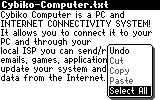
Figure 3. The Context Menu
Press <Menu> or <Fn><Enter> to open the context menu. Choose the item you want by using <Up/Down arrows>. Press <Enter> or <Select> to execute the action.
Table 2. Editing the text
| Context Menu Item | Operation |
| Undo | Cancels the last operation. You can cancel only one operation. |
| Select All | Selects all text. |
| Cut | Cuts the selected text and moves it to the clipboard. |
| Copy | Copies the selected text to the clipboard. |
| Paste | Pastes text from the clipboard. |
Also, if you press <Esc> to exit, the application will ask you "Do you want to save changes?" Choose "Yes" to save changes or "No" if you don't want to save them (use <Left/Right arrows> to move between the buttons.) Then press <Enter>.
You will see the file list. You can either open another text file or press <Esc> to move one level up or exit if already on the upper level.
or